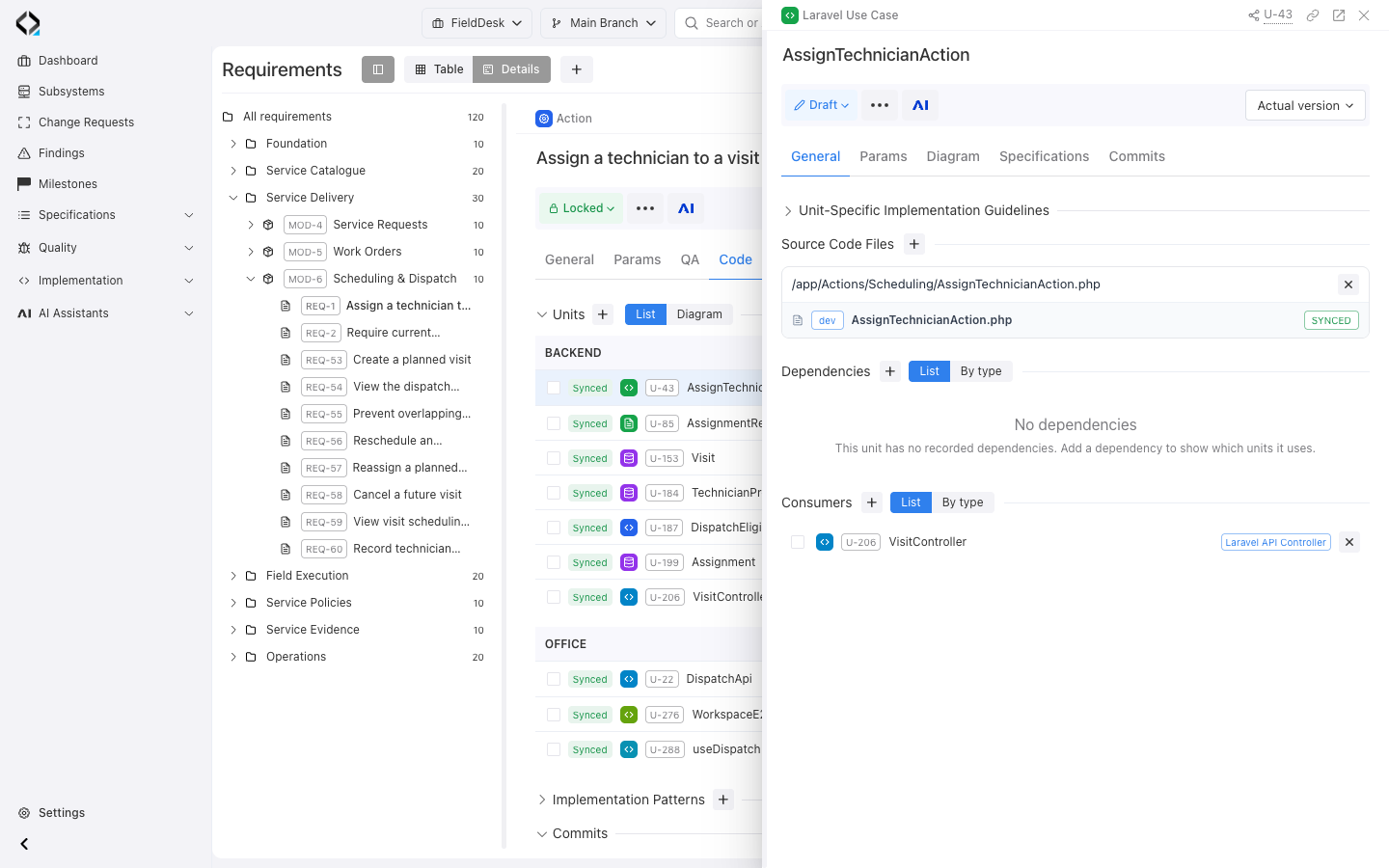
Software requirements describe what a product should do, which rules it must follow and how well it should work. Requirements management means agreeing on these needs, keeping them up to date and linking them to code and checks. You can start with one feature and one developer. The goal is to keep important decisions available after the conversation ends.
Requirements Management for AI Coding Agents
A coding agent can turn a request into working code. But does the code do what the product needs? Will it still work after the next change? Clear requirements help you build the right thing and check the result.
Describe results you can check
“Add technician assignment” names a task but leaves important questions open. A useful requirement states the rule and explains what should happen when someone tries to break it.
For example, a feature for scheduling visits might have these requirements:
- A dispatcher can assign a technician only if that person has no other confirmed visit at the same time.
- If the visits overlap, the system rejects the new assignment and keeps the schedule unchanged.
- The interface explains the conflict so the dispatcher can choose another technician or time.
- If two requests arrive at the same time, the system must still prevent overlapping assignments.
These requirements define results you can check. Developers can still choose how to build the feature. API specifications, data rules and architecture rules add the details they need. Performance and security requirements also need clear conditions and a way to decide whether they are met.
Keep each requirement clear, specific and possible to test. Record open questions until someone answers them. For example, should a cancelled visit still block a time slot?
One requirement · Two uses
No overlapping confirmed assignments
Reject conflicts · Keep the schedule unchanged · Handle requests at the same time
Guide implementation
- Product Intent and behavior
- Data model, API, User Interface
- Current Implementation Scope
Define what to check
- Conflicting requests are rejected.
- The schedule remains unchanged.
- The rule also applies to requests made at the same time.
Check the code and behavior against the requirement
 Code
review
Code
review API tests,
including requests made at the same time
API tests,
including requests made at the same time UI
checks
UI
checksResults + open questions Human review
Decide what to fix, what still needs checking and whether the requirement should change.
Give the agent clear decisions
Without clear requirements, an agent has to work out what you want from code, examples and past conversations. Existing code shows what happens today. It may also contain the bug you want to fix.
Reviewing requirements helps reduce this guesswork. They explain what to change and which rules to keep. They also help you spot missing details before coding starts. You can restart a session, switch agents or pass work to another developer without explaining every decision again.
This starts during discovery, when you explore an idea and decide what to build. In Reqode, AI Analyst can help you clarify an idea and prepare changes to specifications. You review these changes before applying them. This is useful even for one developer planning a new feature.
Check the same requirement in different ways
Source-code review and analysis
Does the code prevent overlapping assignments, even when requests arrive at the same time? Does the rule apply to every way of assigning a technician?
Evidence to keepLinks to the code you reviewed, problems found and open questions.
Automated tests
Test valid assignments, overlapping visits and requests that arrive at the same time. Check both API responses and saved data.
Evidence to keepResults from tests that ran, with the code version and test environment.
QA through the interface
Try to assign a technician to overlapping visits. Check the message and make sure the schedule stays unchanged.
Evidence to keepThe steps you tried, what happened and any screenshots or recordings.
Each method can find different problems. Code review can reveal a missing check. Running tests shows how the code behaves in tested cases. UI checks help you see whether users understand a problem and can resolve it. Security and performance may need extra analysis or tests.
Reqode supports these methods through checks of code against specifications and test management. An AI check can report a possible mismatch between code and specifications. You still need to review it. The report does not prove that tests ran or that the feature works correctly.
Review the requirement itself, too. Code and tests may be based on the same wrong idea. They can agree with each other and still fail to meet the user's need. Verification checks whether the result meets the requirements. Validation checks whether it solves the intended problem. NASA's systems engineering guidance explains this difference.
Spend less time gathering context
Most tasks do not need the full product history. Give the agent the requirement, related specifications, rules and code context for the task. Let it get more details when needed. This approach is described in Anthropic's context engineering guidance.
This can mean fewer repeated questions, less searching and fewer changes to redo. Loading only relevant context can also use fewer tokens than loading large documents and long conversations for every task. Reqode's Coding MCP gives the agent access to the selected product context and helps it find specifications linked to source files.
Token savings are not guaranteed. Writing requirements, getting context and running checks also take time and resources. Compare similar changes that have passed review. Count all tokens, time and review work, including retries and checks. The first prompt is only part of the cost.
Keep requirements up to date
Requirements become less useful if agreed changes are recorded only in chat or code. For each change:
- Agree on what should change. Record decisions that affect how the feature works.
- Review the specifications that need to change. Give the agent a clear task with a defined scope.
- Check the result against the requirements. Record what passed, what failed and what you have not checked.
- Update the agreed specifications and their links to code. If the code and requirements disagree, review the difference. Decide which should change. Do not rewrite the requirement just to match the code.
Start with one feature that you expect to change again. Keep enough detail to build it, check it and plan the next change. A file can be enough if you keep it up to date. A connected workspace becomes useful when you often need to find and update links between requirements, specifications and code.