Change Management
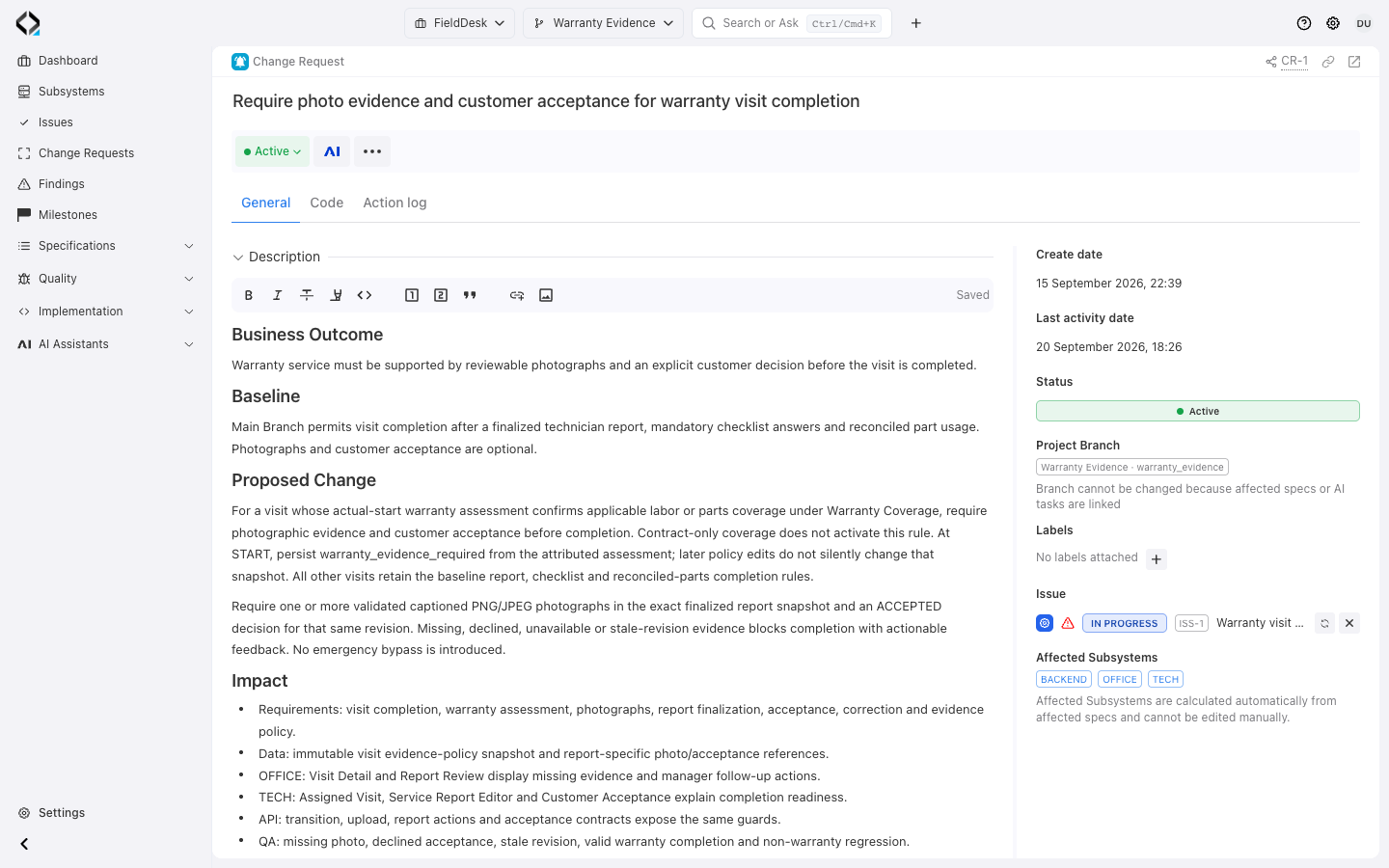
Start with the purpose of CR-1
Require photographs and customer acceptance for warranty completion. CR-1 records the baseline and proposed change in Warranty Evidence.
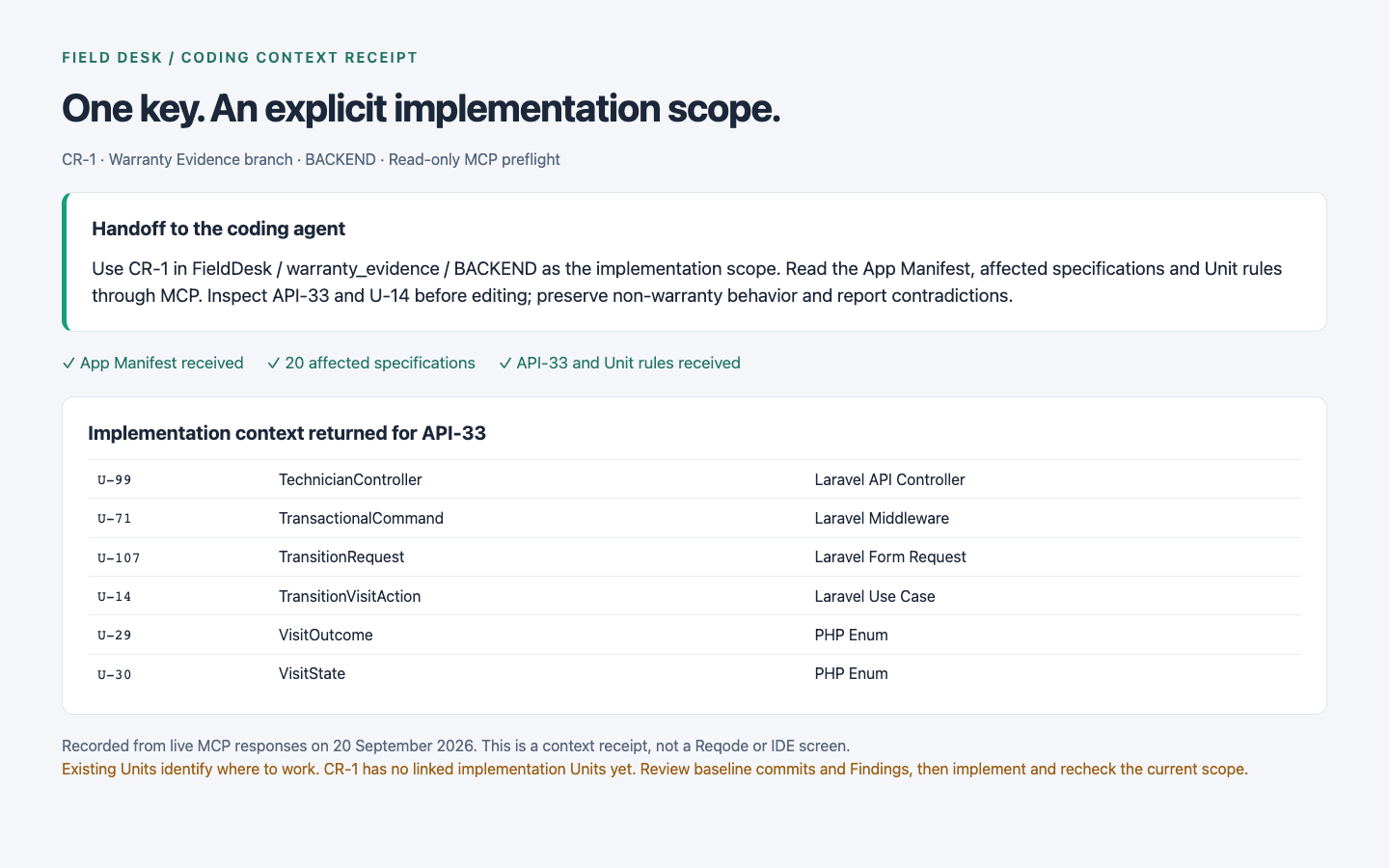
One change. One implementation context.
Keep the accepted scope and its history together, from the initial decision through implementation.

Purpose and context
Give the change a stable CR-* key, a clear
name, and a Markdown description that preserves the motivation and expected outcome.

Project branch
Define the project branch where the change is planned and implemented, including isolated feature, migration, and hotfix work.

Affected spec revisions
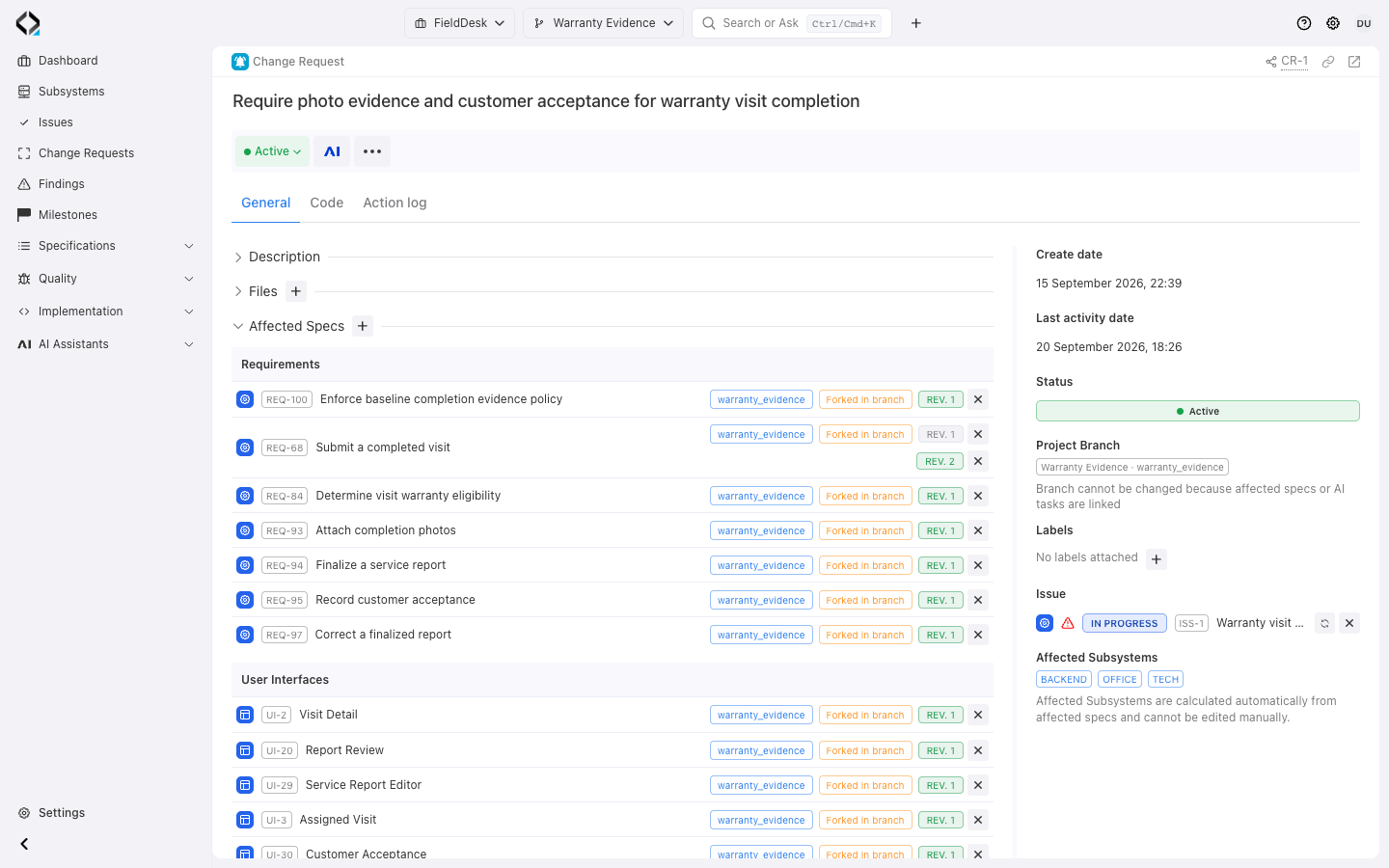
Connect the exact Requirements, User Interfaces, Data Entities, and API Operations affected by the change, including their revision and branch context.

Implementation impact
Derive affected subsystems from the selected specs and inspect the related software units and alignment signals in a read-only Code view.

AI and Issue context
Keep linked AI Analyst summaries and the originating Issue close to the change, without treating a temporary AI answer as product truth.

Clear lifecycle
Work with an Active Change Request, close it into a read-only record when the change is complete, and reopen it when more work is required.
See the full scope without reading every artifact
The General view lists the change and affected revisions; the Code view shows software units derived from those specifications.
Open historical revisions, current branch-effective artifacts, and linked alignment evidence from the change.
Use those links to review implementation impact.
More views
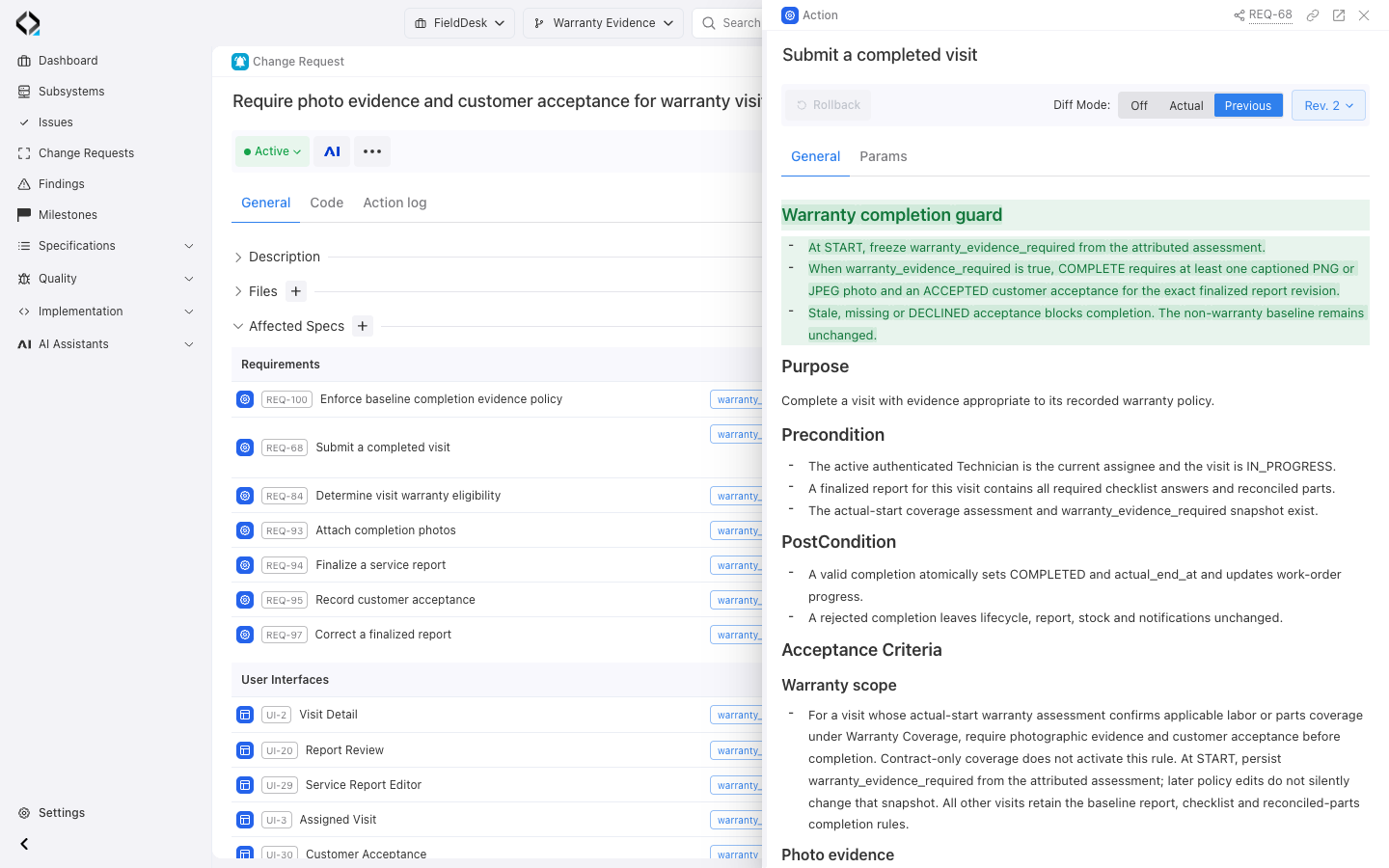
REQ-68 revision 2 compared with Previous: the added warranty completion guard, opened directly from CR-1.
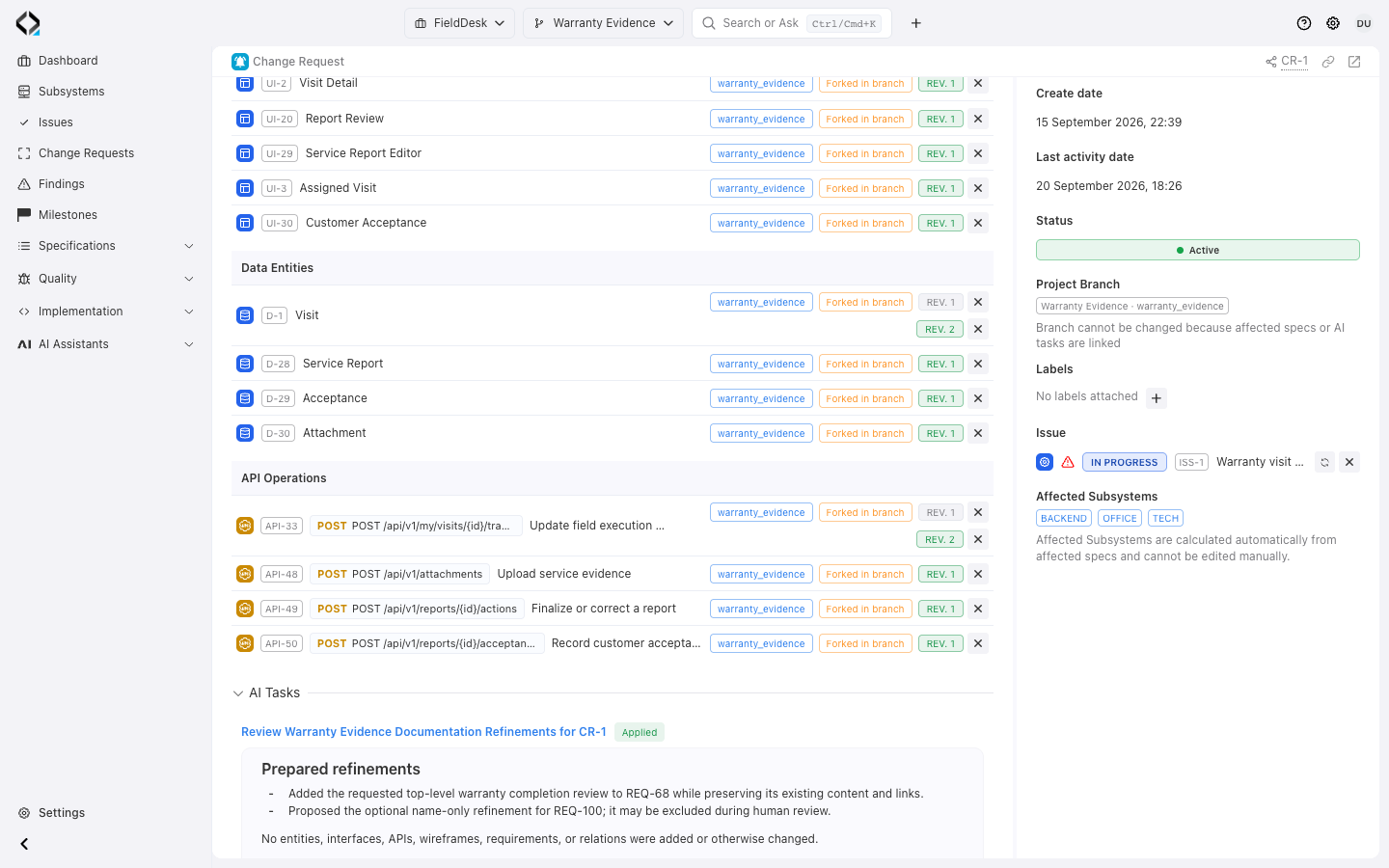
CR-1: affected Data Entities and API Operations, exact revision links, and the applied AI review.
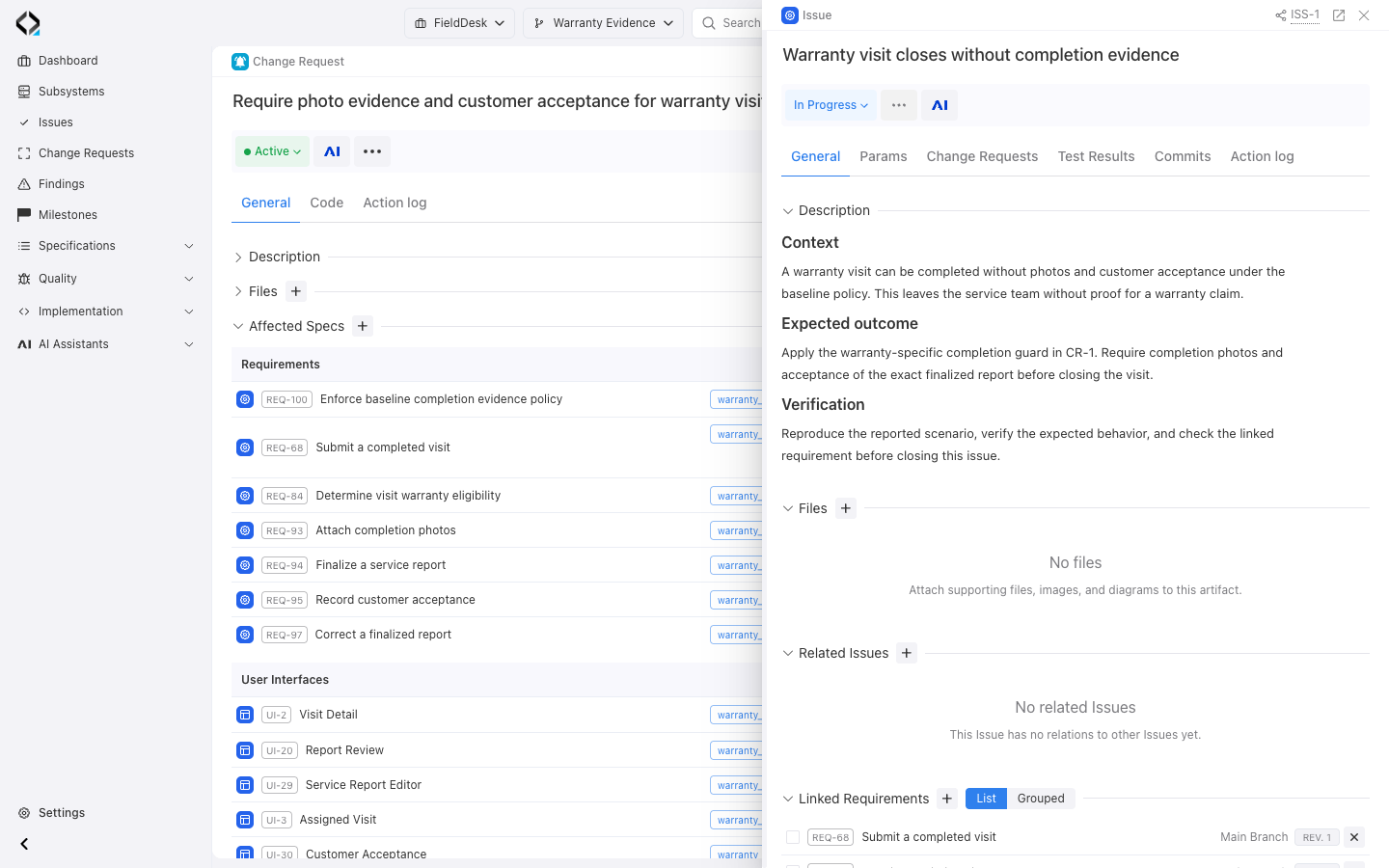
ISS-1: the missing warranty completion evidence and expected outcome that motivated CR-1.
A controlled path from decision to delivery
Use only as much structure as the change needs, while keeping the order of work and the source of truth explicit.
Describe the intent
Record why the behavior must change, the expected outcome, and any implementation guidance that belongs to the change.
Choose the project branch
Use Main for direct work or a project branch when the change needs an isolated effective view before it joins the main product model.
Connect affected specs
Add specification revisions manually, or review and Apply a linked AI Analyst result so its final post-Apply revisions become part of the scope.
Inspect implementation impact
Review derived subsystems, software units, source-spec relations, and alignment markers before deciding where code must change.
Give the agent one key
Pass the CR-* key to a coding agent. Reqode MCP resolves the affected
artifacts in the correct branch and exposes related implementation context.
Check the result and close
Verify specifications, units, code, and tests. Close the Change Request into a read-only record when the work is complete.
Useful throughout the product lifecycle
A few examples of substantial changes that start with a simple request. AI Analyst asks questions and follows up on your answers to clarify the details. Together, you work through the requirements before reviewing the specification diff and approving what to apply.
Add enterprise SSO
- Ask AI Analyst.
“Let enterprise customers sign in with their company identity provider.” - Work through the questions.
AI Analyst asks about identity providers, account creation, and fallback sign-in. Answer its questions and follow-ups to clarify the rules and exceptions. - Review the diff.
Check the proposed authentication requirements, sign-in screens, and API changes. Ask for adjustments where needed. - Approve and apply.
Accept the SSO specification changes. Reqode automatically adds the applied revisions to the linked Change Request’s affected scope.
Fix an incorrect tax calculation
- Ask AI Analyst.
“Tax should be calculated after discounts, but our current rules use the original price.” - Work through the questions.
AI Analyst asks about discount types, rounding, and refunds. Share example totals and answer follow-ups to work through the calculation rules and edge cases. - Review the diff.
Check the proposed calculation rules and affected data and API specifications against your example. - Approve and apply.
Accept the corrected calculation rules. Reqode automatically adds the applied revisions to the linked Change Request’s affected scope.
Add a purchase approval step
- Ask AI Analyst.
“Purchases over $5,000 need manager approval.” - Work through the questions.
AI Analyst asks who can approve, what happens after rejection, and how to handle an absent manager. Answer and refine the workflow through follow-up questions. - Review the diff.
Check the proposed approval rules, statuses, screens, and API changes as one coordinated workflow. - Approve and apply.
Accept the approval workflow specifications. Reqode automatically adds the applied revisions to the linked Change Request’s affected scope.
Extract billing into a separate service
- Ask AI Analyst.
“Move billing into a separate service while keeping existing customer behavior.” - Work through the questions.
AI Analyst asks about data ownership, service dependencies, and migration constraints. Answer its follow-ups to define the boundary and behavior to preserve. - Review the diff.
Check the proposed data ownership, API contracts, and requirements for preserving billing behavior. - Approve and apply.
Accept the revised billing specifications. Reqode automatically adds the applied revisions to the linked Change Request’s affected scope.
Give the agent a change key, not a context dump
Give the agent the CR key. MCP exposes affected artifacts in their branch context and links to relevant units, files, and guidance.
If the change context conflicts with current product truth, the agent is instructed to report the conflict before implementation.
Use Reqode MCP as the source of truth.
Start from CR-184.
Where Change Requests fit
Issues preserve the reason; specifications define behavior; Change Requests define the change to implement.

An Issue records an idea or problem. One or more linked Change Requests define the changes chosen to address it.
No. A known, narrow change can start from a specification or unit key. Use a Change Request for work spanning artifacts, isolated branches, or a durable review trail.
Applying a linked AI Analyst result in the same project branch can add its final revisions to the Change Request. Ordinary specification edits are not added automatically.
A closed Change Request is archived and read-only, with its scope and context preserved. An authorized user can reopen it.
