Specs ↔ Code Alignment
A traceable layer between intent and implementation
One Unit can be aligned with one specification and misaligned with another. Each result is tied to the two revisions used in the check. Inspect the AI Task for the full report.

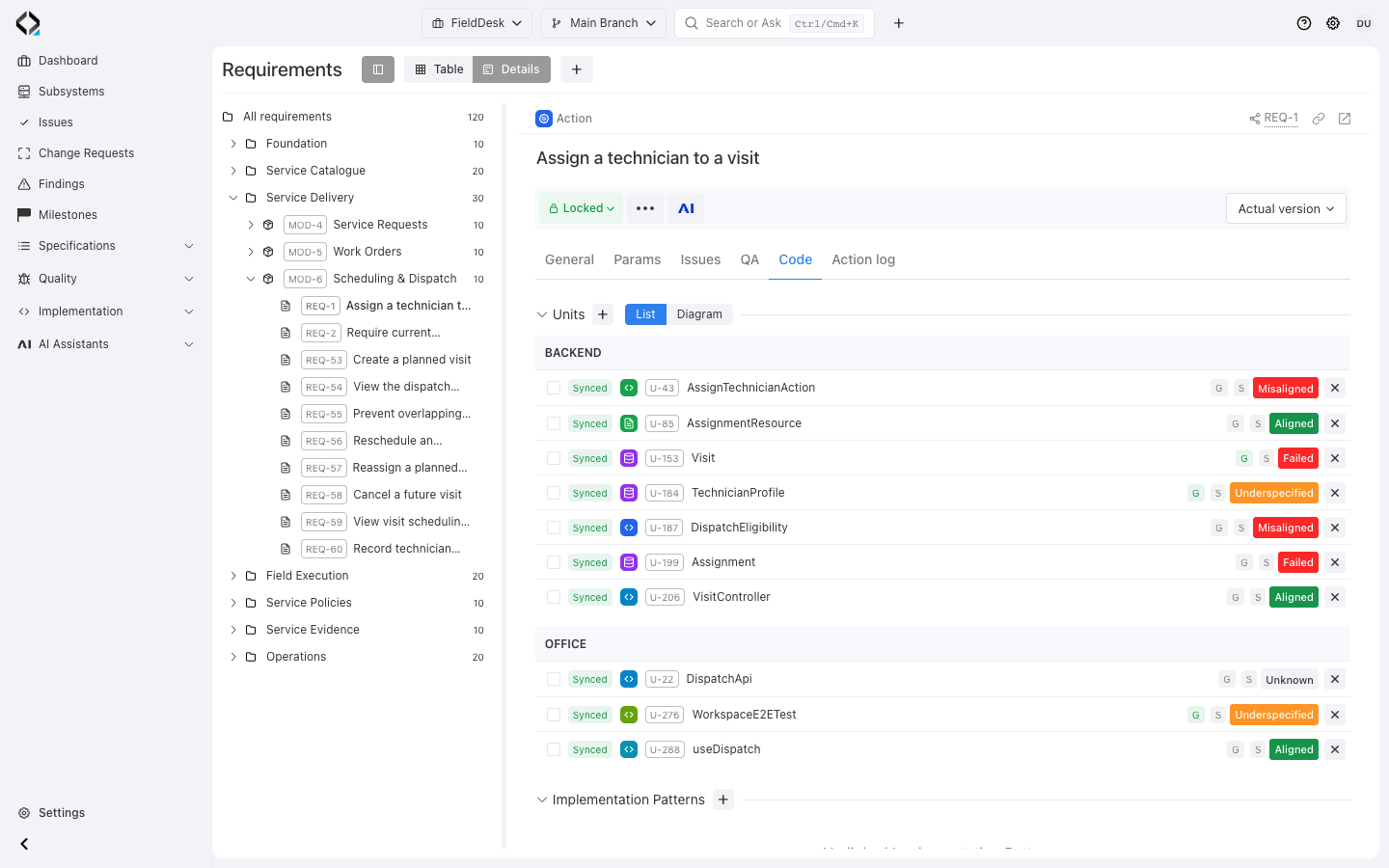
Start from product intent
REQ-1 links technician assignment rules to U-43, the backend action that implements them.
How alignment verification works
The check follows the target Unit’s responsibility and direct specification links.
Select a Software Unit
Run the Alignment Verifier for one Unit in the current project branch, or let an automation rule select an eligible unverified Unit.
Prepare focused context
Reqode assembles the Unit files, Unit Type instructions, subsystem Code Manifest, direct dependencies and consumers, linked specifications and existing alignment Findings.
Check every direct relation
The verifier evaluates whether the target Unit implements each directly linked specification and whether significant Unit behavior is underspecified.
Record states and evidence
Each relation receives an alignment state, explanation, checked date and the exact Unit and specification revisions used by the check.
Create or resolve Findings
Confirmed drift creates or updates a Finding. When a previous problem is no longer present, the next successful check can mark it solved.
One Unit, clear relation states
The result shows whether implementation matches the linked specifications, needs more specification detail, or contains confirmed drift.
Aligned
The implementation agrees with the linked specification for the responsibility of the target Unit.
Underspecified
The Unit contains significant behavior that belongs to its responsibility but is not fully described by the linked specifications.
Misaligned
Confirmed implementation behavior contradicts or fails to satisfy a directly linked specification.
Findings make implementation drift operational
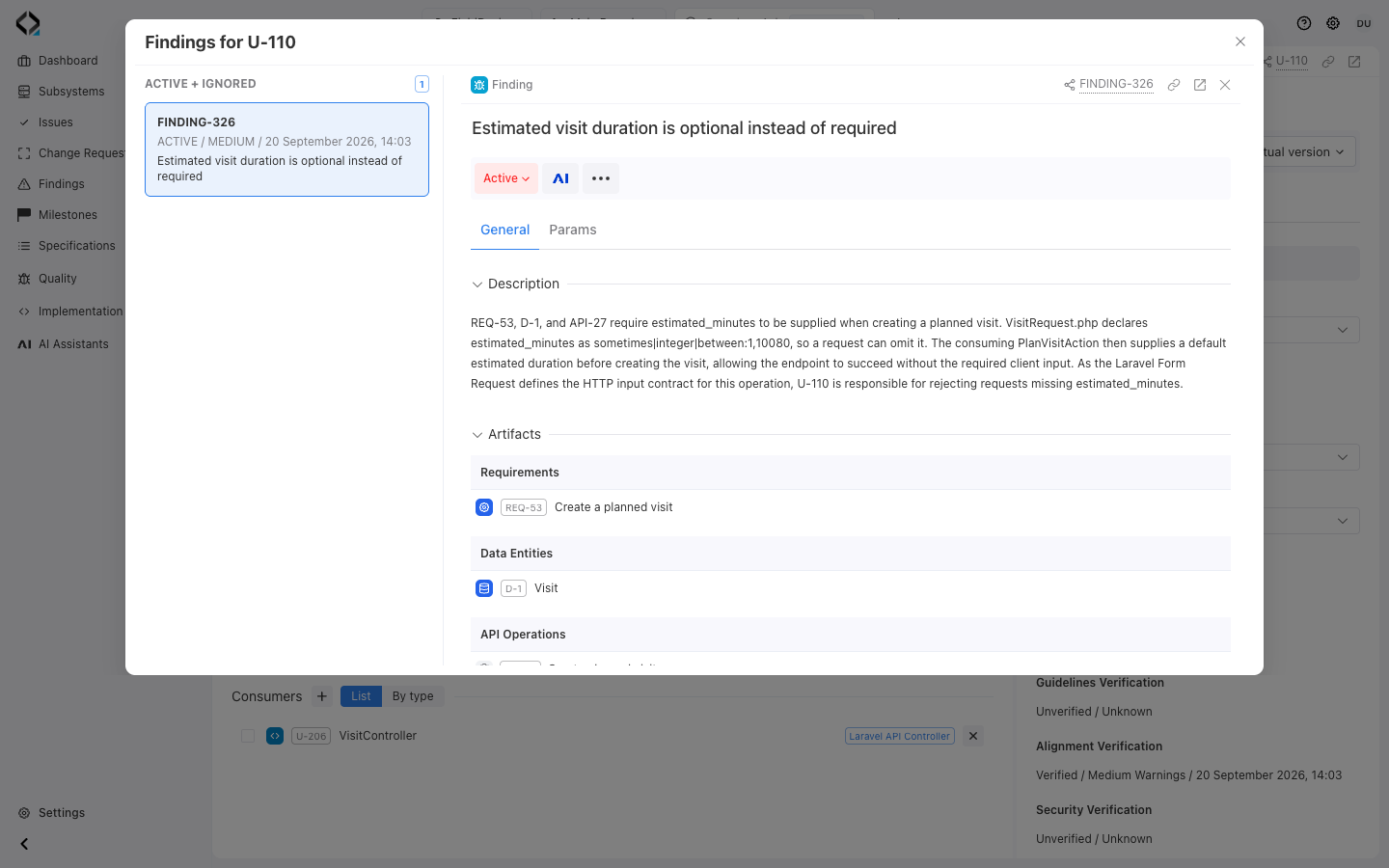
A branch-aware Finding links confirmed drift to the target Unit and relevant specification, with severity, evidence, and solution options. Later checks update the existing Finding.
The Finding preserves severity, explanation, affected artifacts and practical solution options. Repeated verification updates the same problem instead of producing a disconnected report every time.
The verifier records the result—it does not silently rewrite the product
Results update relation states, Unit verification fields, and Findings. They do not modify code, specifications, Unit files, dependencies, or relations. Your team chooses the correction.
It does not modify source code, specification content, Unit files, dependencies or relations. The team chooses the appropriate repair and can verify the result again.
Choose the right repair
Fix code
Change the implementation when the specification correctly describes the intended behavior.
Fix specifications
Update the product model when the implementation reflects an intentional decision that is missing or outdated in the specifications.
Fix Unit mapping
Correct Unit ownership, file paths, dependencies, consumers or specification relations when the verification scope is wrong.
Run a focused manual check
Launch the Alignment Verifier from a Software Unit, select an allowed model preset and optionally add instructions for the check.
The result is recorded in the AI Task report and applied to the same project branch in which the check was started.
Configure alignment automation
Create a Specs ↔ Code Alignment Check rule for a project branch and subsystem. Configure the model, run mode, optional prompt and maximum checks per run.
Choose the right next step
Investigate the linked requirement when behavior is unclear, follow Continuous Verification to manage findings, or inspect Test Management for execution evidence from the running product.


