API Operations and Surfaces
Choose an API Surface, document the operation contract, and connect it to the behavior and data it supports.
Choose where the API contract belongs
An API Surface groups the operations a subsystem exposes to a client or integration. Choose the surface used by the operation's caller.
To add a surface, open the owning subsystem in Architecture and use Create API Surface on its API tab. This requires architecture management permission. Under API Operation Types, use New API Operation Type or Add Existing Types and select the surface it applies to.
Describe the operation contract
- Open Specifications → API Operations, navigate to the API Surface, and choose Create API Operation.
- Enter a Name that describes the operation. Use its technical identifier as the Technical Name. For HTTP, this can be the method and path. Choose the Location and a Type available there, then select Create.
- Document the contract in Description.
| Contract point | What to record |
|---|---|
| Caller | Who can call the operation and what access it requires. |
| Input | Required parameters, request body, and validation rules. |
| Success | The response and any changes the caller can observe. |
| Error | When the operation returns an error and what the caller receives. |
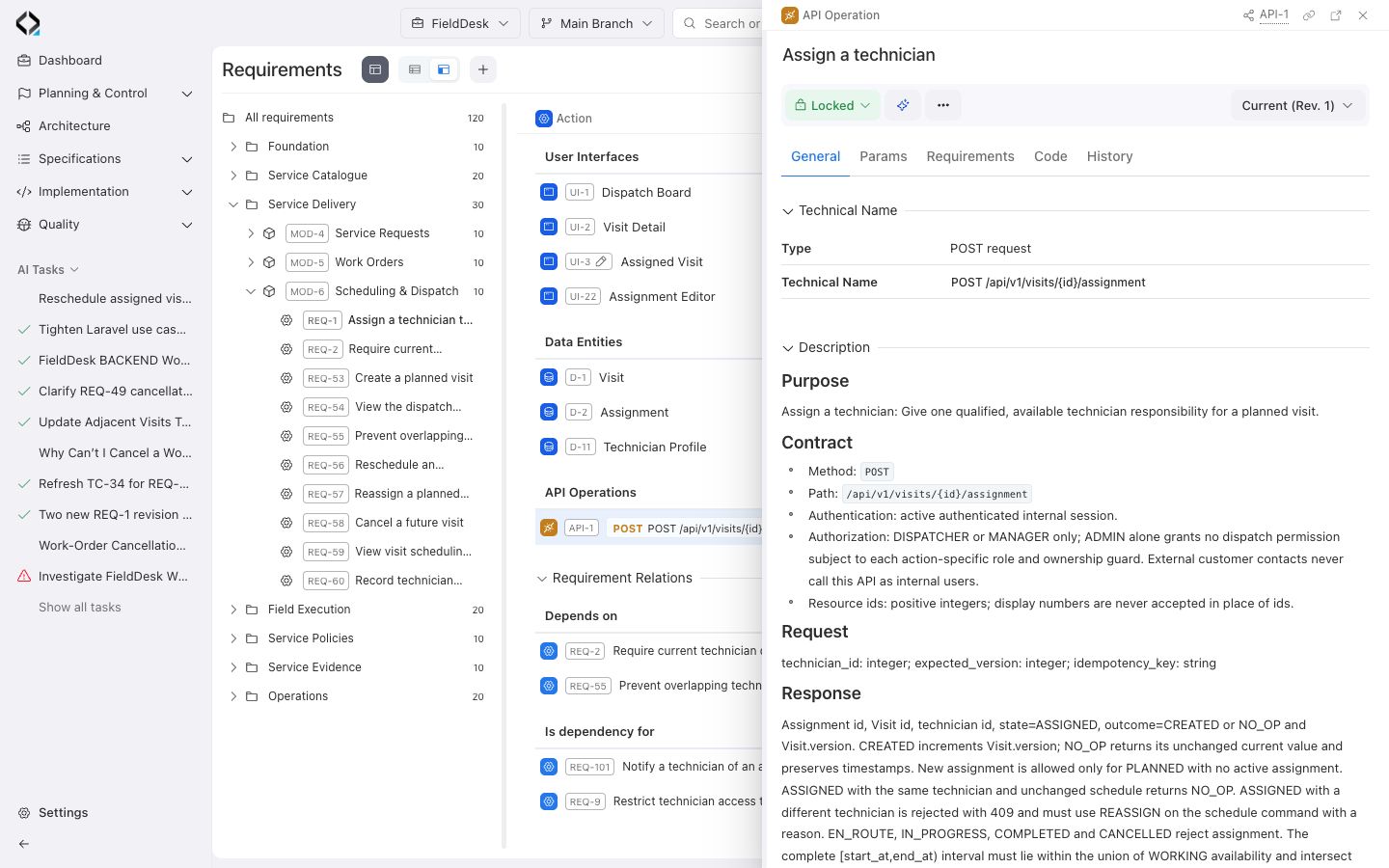
Verify the requirement's specification set
Open the requirement that the operation supports and use Specifications → + → API Operations to link it. Open the operation from the requirement and check that its contract supports the expected behavior.