Contact Us
Contact us if you have any questions, suggestions or you need personal Demo of Reqode. Use the form or write us a letter.
Getting Started
Code
Subsystem Manifest
Purpose
A Subsystem Manifest is the set of subsystem attributes that define:
- how the subsystem is identified in Reqode,
- what it is responsible for,
- which subsystem-wide technical rules AI assistants should follow.
The manifest must contain only information that is common for the whole subsystem.
Where to find in UI
- Project Settings → Subsystems → (… → Edit)
- or Project Settings → Subsystems → + (create)
Then use the Subsystem Editor tabs:
- General
- Code
Prerequisites
- User is a member of the project.
- Permissions scope: Project Settings.
Step-by-step
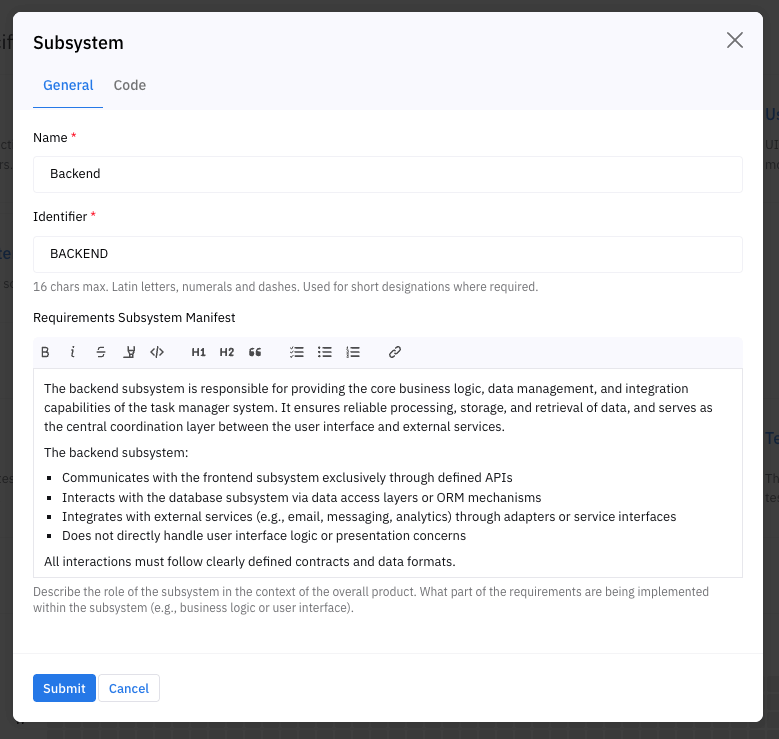
1) Fill in General tab
Fields:
- Name (required)
- Identifier (required)
- Requirements Subsystem Manifest (optional, WYSIWYG/Markdown)
Validation rules:
- Identifier is required and must be:length 1..16,characters A–Z a–z 0–9 -,unique within the project.
- length 1..16,
- characters A–Z a–z 0–9 -,
- unique within the project.
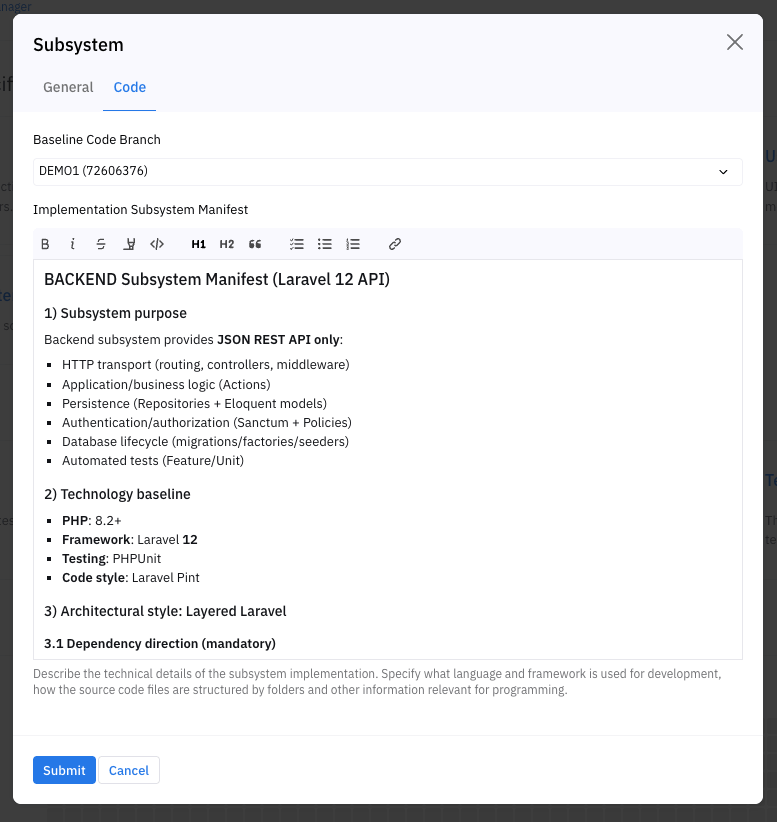
2) Fill in Code tab (optional)
Fields:
- Baseline Code Branch (optional)
- Implementation Subsystem Manifest (optional, WYSIWYG/Markdown)
Notes:
- Baseline Code Branch can be left as Not Defined.
- Implementation Subsystem Manifest should contain subsystem-wide rules only.
3) Save
- Click Submit to save.
- Click Cancel to close without saving.
Result
- The subsystem appears in the project subsystem list.
- Requirements can be assigned to this subsystem.
- AI assistants can use your subsystem-wide guidance.
Errors / Constraints
- Identifier already exists: you must choose a different Identifier.
- Invalid Identifier format: use only A–Z a–z 0–9 -, max length 16.
- Network/server error: changes are not saved.
Best practices
Requirements Subsystem Manifest: good vs bad
Good (explains role and boundaries):
- "Frontend web app for the Reqode UI. Talks to backend via REST. No business logic; only UI and client-side state."
- "Backend monolith. Owns authentication, requirements storage, and API for all UIs."
Bad (too generic / not actionable):
- "Frontend"
- "Does everything"
- "Main service"
Implementation Subsystem Manifest: good vs bad
Good (subsystem-wide and specific enough):
- "Use TypeScript. Prefer feature-sliced structure under /src/features."
- "All new API calls must go through the shared httpClient wrapper."
- "Do not introduce new global state libraries; use the existing one."
Bad (unit-type specific or too low-level):
- "In component X, create method fooBar()" (too specific)
- "Use NestJS module layout for controllers" (belongs to a backend unit type, not the subsystem manifest)
- "Write clean code" (not actionable)
Naming and identifiers
- Keep Identifier stable over time. Changing it may break references in requirements.
- Use short, readable identifiers: BACKEND, WEB, MOBILE, WYSIWYG.